


Invoicing Made Easy with Cleo
Connect. Automate. Get Paid Faster.
Combine the power of Cleo Web EDI and QuickBooks Desktop. Say goodbye to manual data entry and invoice delays. Cleo’s QuickBooks Desktop EDI Integration automates order and invoice processing — saving you time, reducing errors, and keeping your business compliant.
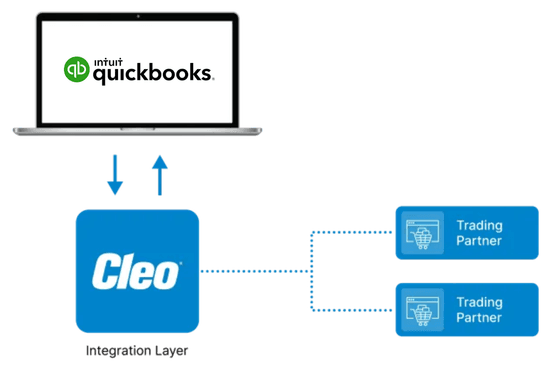
How It Works: Connecting Systems
Automate Invoicing
Sales Orders automatically convert to Invoices (EDI 810) and transmit to your trading partners through Cleo’s Web EDI Fulfillment Portal.
- Make Invoicing Easy Automate your entire order-to-invoice process — no more rekeying or data entry.
- Improve Accuracy Eliminate manual errors and prevent costly chargebacks.
- Save Time Process orders and invoices in seconds, not hours.
- Stay Compliant Maintain full EDI compliance with all your trading partners.
- Get Live Support Our expert team is always available — think of us as your personal EDI department.
Why Choose Cleo

Do More, Faster—with Cleo
Automated order-to-invoice processing

Real-time visibility and detailed reporting

QuickBooks-approved & preferred provider

Easy to use, quick to implement

Scalable for any number of trading partners

What Real Suppliers Say
"We were up and running in no time. Cleo’s team communicated with us every step of the way — truly partners in every sense of the word."
— Shannon Peters, LunchSkins

Question?
Fill out the form and a team member will reach out shortly
Reach Out To Us! Live Support Is Just A Phone Call Or Email Away.
+1.815.282.7684

PARTNER WITH CLEO TO
Simplify Your QuickBooks Desktop Invoicing Today
Cleo’s Web EDI and QuickBooks Desktop EDI Integration helps you connect, automate, and grow — all while making invoicing effortless.